---
name: WeChat Official Account Operator
slug: wechat-official-account-operator
category: Automation
description: "Automate WeChat Official Account operations: content curation from 20+ sources, daily/weekly analytics reports, and comment reply management."
github: "https://github.com/IanShaw027/wemp-operator"
language: JavaScript
stars: 102
forks: 19
install: "git clone https://github.com/IanShaw027/wemp-operator"
added: 2026-07-16T03:20:46.789Z
last_synced: 2026-07-16T03:20:46.789Z
canonical_url: "https://dirskills.com/skills/wechat-official-account-operator"
---
# WeChat Official Account Operator
Automate WeChat Official Account operations: content curation from 20+ sources, daily/weekly analytics reports, and comment reply management.
**Install:** `git clone https://github.com/IanShaw027/wemp-operator`
## README
# wemp-operator






微信公众号自动化运营 OpenClaw Skill - 内容采集、数据分析、互动管理
## ✨ 功能特性
- 📝 **内容采集** - 从 20+ 数据源智能采集热点,支持关键词过滤和深度抓取
- 📊 **数据分析** - 自动生成日报/周报,包含用户增长、阅读数据、AI 洞察
- 💬 **互动管理** - 评论检查、智能回复建议、批量精选
- 🔌 **70 个 API** - 完整的微信公众号 API 集成,无需额外依赖
## 🚀 工作流程
```
┌─────────────────────────────────────────────────────────────────┐
│ 内容采集工作流 │
├─────────────────────────────────────────────────────────────────┤
│ 用户需求 → AI 扩展关键词 → 选择数据源 → 采集热点 → 筛选输出 │
└─────────────────────────────────────────────────────────────────┘
│
▼
┌─────────────────────────────────────────────────────────────────┐
│ 数据分析工作流 │
├─────────────────────────────────────────────────────────────────┤
│ 获取统计 → 计算指标 → 生成洞察 → 输出报告 → 推送通知 │
└─────────────────────────────────────────────────────────────────┘
│
▼
┌─────────────────────────────────────────────────────────────────┐
│ 互动管理工作流 │
├─────────────────────────────────────────────────────────────────┤
│ 检查评论 → AI 生成回复 → 用户确认 → 执行回复/精选 │
└─────────────────────────────────────────────────────────────────┘
```
## 📦 安装
### 方式一:ClawHub 安装(推荐)
```bash
openclaw skill install IanShaw027/wemp-operator
```
### 方式二:手动安装
```bash
git clone https://github.com/IanShaw027/wemp-operator.git ~/.openclaw/skills/wemp-operator
```
## ⚙️ 配置
在 `~/.openclaw/openclaw.json` 中配置公众号:
```json
{
"channels": {
"wemp": {
"enabled": true,
"appId": "你的公众号 AppID",
"appSecret": "你的公众号 AppSecret"
}
}
}
```
> 获取 AppID/AppSecret:登录 [微信公众平台](https://mp.weixin.qq.com) → 开发 → 基本配置
## 📖 使用
### 自然语言交互(推荐)
安装 skill 后,直接用自然语言与 OpenClaw 对话即可。Skill 会根据触发词自动激活。
**内容采集:**
```
帮我采集今天的 AI 热点
从 Hacker News 和 V2EX 采集科技新闻
采集大模型相关的热点,关键词:GPT、Claude、LLM
```
**数据分析:**
```
生成公众号日报
看看昨天的公众号数据
生成本周的周报
```
**互动管理:**
```
检查公众号新评论
有没有需要回复的评论
帮我精选这条评论
```
### 工作原理
```
┌─────────────────────────────────────────────────────────────────┐
│ 1. 用户请求 │
│ "帮我采集今天的 AI 热点" │
└─────────────────────────────────────────────────────────────────┘
│
▼
┌─────────────────────────────────────────────────────────────────┐
│ 2. Skill 自动激活 │
│ 触发词匹配:采集热点、公众号日报、检查评论... │
│ OpenClaw 读取 SKILL.md 获取操作指南 │
└─────────────────────────────────────────────────────────────────┘
│
▼
┌─────────────────────────────────────────────────────────────────┐
│ 3. AI 执行任务 │
│ • 调用 scripts/ 下的脚本 │
│ • 使用 70 个微信 API │
│ • 整合 20+ 数据源 │
└─────────────────────────────────────────────────────────────────┘
│
▼
┌─────────────────────────────────────────────────────────────────┐
│ 4. 返回结果 │
│ 格式化输出、AI 洞察、操作建议 │
└─────────────────────────────────────────────────────────────────┘
```
### 触发词
| 功能 | 触发词 |
|------|--------|
| **内容采集** | 采集热点、采集新闻、收集素材 |
| **数据分析** | 公众号日报、公众号周报、数据报告 |
| **互动管理** | 检查评论、回复评论、精选评论 |
| **文章管理** | 生成文章、发布文章、草稿管理 |
### 高级用法:命令行
如需直接调用脚本(调试或自动化场景):
内容采集
```bash
node scripts/content/smart-collect.mjs \
--query "AI热点" \
--keywords "AI,LLM,大模型,GPT" \
--sources "hackernews,v2ex,36kr" \
--deep
```
数据分析
```bash
# 生成日报
node scripts/analytics/daily-report.mjs
# 生成周报
node scripts/analytics/weekly-report.mjs
# 指定日期
node scripts/analytics/daily-report.mjs --date 2026-02-01
```
互动管理
```bash
# 检查新评论
node scripts/interact/check-comments.mjs
# 回复评论
node scripts/interact/reply.mjs --comment-id --content "感谢支持!"
# 精选评论
node scripts/interact/manage.mjs --elect --comment-id
```
## 🔌 API 模块 (70 个)
统计 API (8)
| API | 功能 |
|-----|------|
| `getUserSummary` | 用户增长概况 |
| `getUserCumulate` | 用户累计数据 |
| `getArticleSummary` | 文章阅读统计 |
| `getArticleTotal` | 文章总量统计 |
| `getUserRead` | 用户阅读统计 |
| `getUserShare` | 用户分享统计 |
| `getUpstreamMsg` | 消息统计 |
| `getUpstreamMsgHour` | 消息分时统计 |
草稿 API (6)
| API | 功能 |
|-----|------|
| `addDraft` | 创建草稿 |
| `updateDraft` | 更新草稿 |
| `getDraft` | 获取草稿 |
| `listDrafts` | 草稿列表 |
| `deleteDraft` | 删除草稿 |
| `getDraftCount` | 草稿数量 |
发布 API (5)
| API | 功能 |
|-----|------|
| `publishDraft` | 发布草稿 |
| `getPublishStatus` | 发布状态 |
| `listPublished` | 已发布列表 |
| `getPublishedArticle` | 文章详情 |
| `deletePublished` | 删除已发布 |
评论 API (8)
| API | 功能 |
|-----|------|
| `listComments` | 评论列表 |
| `replyComment` | 回复评论 |
| `deleteCommentReply` | 删除回复 |
| `electComment` | 精选评论 |
| `unelectComment` | 取消精选 |
| `deleteComment` | 删除评论 |
| `openComment` | 开启评论 |
| `closeComment` | 关闭评论 |
用户 API (7)
| API | 功能 |
|-----|------|
| `getUserInfo` | 用户信息 |
| `batchGetUserInfo` | 批量用户信息 |
| `getFollowers` | 关注者列表 |
| `setUserRemark` | 设置备注 |
| `getBlacklist` | 黑名单列表 |
| `batchBlacklistUsers` | 加入黑名单 |
| `batchUnblacklistUsers` | 移出黑名单 |
标签 API (8)
| API | 功能 |
|-----|------|
| `createTag` | 创建标签 |
| `getTags` | 标签列表 |
| `updateTag` | 更新标签 |
| `deleteTag` | 删除标签 |
| `batchTagUsers` | 批量打标签 |
| `batchUntagUsers` | 批量取消标签 |
| `getUserTags` | 用户标签 |
| `getTagUsers` | 标签下用户 |
模板消息 API (5)
| API | 功能 |
|-----|------|
| `getTemplates` | 模板列表 |
| `addTemplate` | 添加模板 |
| `deleteTemplate` | 删除模板 |
| `sendTemplateMessage` | 发送模板消息 |
| `getIndustry` | 行业信息 |
素材 API (6)
| API | 功能 |
|-----|------|
| `uploadTempMedia` | 上传临时素材 |
| `uploadPermanentMedia` | 上传永久素材 |
| `uploadArticleImage` | 上传文章图片 |
| `getMaterialCount` | 素材数量 |
| `getMaterialList` | 素材列表 |
| `deleteMaterial` | 删除素材 |
客服消息 API (7)
| API | 功能 |
|-----|------|
| `sendTextMessage` | 发送文本 |
| `sendImageMessage` | 发送图片 |
| `sendVoiceMessage` | 发送语音 |
| `sendVideoMessage` | 发送视频 |
| `sendNewsMessage` | 发送图文 |
| `sendMpNewsMessage` | 发送公众号文章 |
| `sendTypingStatus` | 输入状态 |
菜单 API (4)
| API | 功能 |
|-----|------|
| `createMenu` | 创建菜单 |
| `getMenu` | 获取菜单 |
| `deleteMenu` | 删除菜单 |
| `getCurrentMenuInfo` | 当前菜单信息 |
二维码 API (2)
| API | 功能 |
|-----|------|
| `createQRCode` | 创建二维码 |
| `getQRCodeImageUrl` | 获取二维码图片 |
群发 API (5)
| API | 功能 |
|-----|------|
| `massSendByTag` | 按标签群发 |
| `massSendByOpenIds` | 按ID群发 |
| `previewMassMessage` | 群发预览 |
| `getMassMessageStatus` | 群发状态 |
| `deleteMassMessage` | 删除群发 |
## 📡 数据源 (20+)
| 类别 | 数据源 |
|------|--------|
| **科技** | hackernews, github, v2ex, sspai, juejin, ithome, producthunt |
| **中文热点** | weibo, zhihu, baidu, douyin, bilibili, toutiao, tencent, thepaper, hupu |
| **财经** | 36kr, wallstreetcn, cls |
**快捷分类:**
- `tech` - 所有科技类
- `china` - 所有中文热点
- `finance` - 所有财经类
- `all` - 全部数据源
## 📁 项目结构
```
wemp-operator/
├── SKILL.md # AI 指令文件
├── scripts/
│ ├── setup.mjs # 环境检查
│ ├── lib/utils.mjs # 70 个微信 API
│ ├── content/ # 内容采集
│ ├── analytics/ # 数据分析
│ └── interact/ # 互动管理
└── templates/ # 报告模板
```
## 📊 日报示例
```
📊 **公众号日报** (2026-02-01)
━━━━━━━━━━━━━━━━━━━━━━━━━━━━
**👥 用户数据**
• 新增关注: +23
• 取消关注: -5
• 净增长: +18 (↑12%)
• 累计粉丝: 1,234
**📖 阅读数据**
• 总阅读: 2,456 次 (↑15%)
• 总分享: 89 次
**🔥 热门文章**
1. 《Claude 4 深度解析》
2. 《AI 编程工具对比》
3. 《GPT-5 传闘分析》
**💬 互动数据**
• 新消息: 12 条
• 新评论: 8 条
**💡 AI 洞察**
今日净增 18 位粉丝,保持良好增长势头。
━━━━━━━━━━━━━━━━━━━━━━━━━━━━
```
## 🤝 贡献
欢迎提交 Issue 和 Pull Request!
```bash
# Fork 仓库后
git clone https://github.com/YOUR_USERNAME/wemp-operator.git
cd wemp-operator
git checkout -b feat/your-feature
# 修改代码...
git commit -m "feat: your feature"
git push origin feat/your-feature
# 创建 Pull Request
```
## 📜 许可证
[MIT License](LICENSE)
## ⭐ Star History
[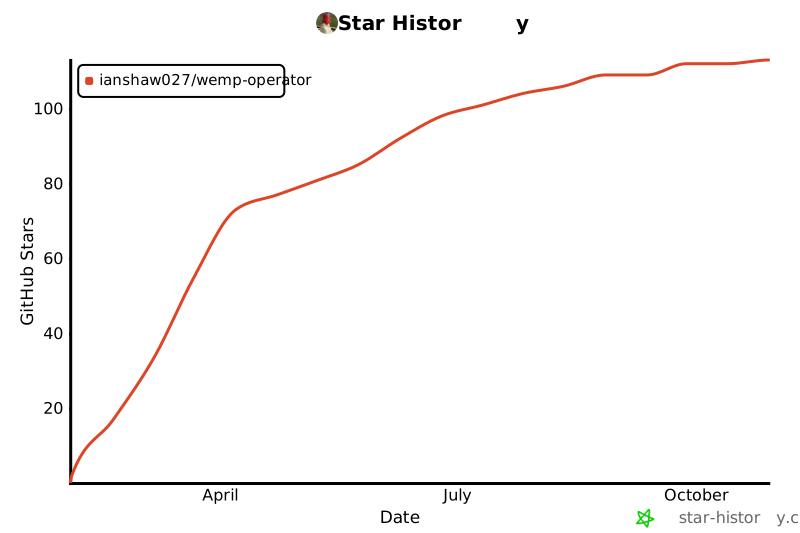](https://star-history.com/#IanShaw027/wemp-operator&Date)
---
Made with ❤️ by IanShaw027